

Wonik Robotics Allegro Hand V4, L/R
Understand this hand
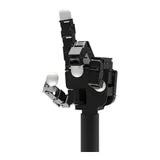
Allegro Hand V4 is a four-finger research hand with 16 independently torque-controlled joints, according to Wonik’s product page.
- What distinguishes it
- Its published specifications describe CAN communication and the complete hand mass. Keep the V4 identity when following the substantial Allegro research literature.
- Before you build
- Check that the driver, simulator and joint limits correspond to V4. A paper using Allegro does not by itself identify the generation or its tactile equipment.
Evidence review · 2026-09-25
Manufacturer, author and seller statements checked against public sources. This is not an independent hardware test. Fields outside this review retain their earlier evidence dates.
- Model / DOF
- V4: 16 active axes; do not transfer specifications between generations. Source ↗
- Weight
- 1.08 kg total hand mass; mounting equipment scope requires confirmation. Source ↗
- Sensing / software
- Joint position sensing listed. Manufacturer product page does not establish a tested SDK release. Source ↗
- Price / availability
- USD 10,350 visible on seller page, including stated US tariff; delivery unconfirmed. Source ↗
Specifications
Record source date: 2026-09-16
Active / total DOF: 16 / 16
Joint potentiometers / position; no standard tactile array specified
Weight basis: Manufacturer total hand weight
Availability / status: Current / marketed
Evidence limits: USD 10,350 seller observation includes USD 1,350 US tariff; freight, configuration and availability require confirmation. Payload is not a continuous fingertip-force rating.
Price scope: USD10,350 seller listing; includes USD1,350 US tariff; freight and final configuration extra/subject to confirmation
Start with Allegro Hand V4
Load the correct left or right V4 model and document its joint mapping before commissioning a controller.
The linked V4 ROS repository documents a legacy ROS Kinetic stack and a separate visualization launch. Dexhands reviewed the instructions; we have not built the driver or operated this hand.
Sources reviewed 2026-09-30 · no hardware connection from this pageBefore you start: versions and requirements
Allegro V4, left or right. The referenced driver documents ROS Kinetic, not a verified ROS 2 setup. Record your actual driver commit and hand revision.
- A matching V4 model and a compatible ROS environment following the original repository.
- The correct handedness and model/parameter files.
- For later hardware work: the unit-specific calibration and supported CAN interface, confirmed against its documentation.
Choose the exact V4 configuration
Match the physical revision and handedness to the description files. Review the repository’s environment and license before installation; do not substitute V5 or V5 Sense files.
V4 driver and model documentationOpen the visualization, without a hardware controller
After building and sourcing the documented workspace, start the separate visualization example with hardware disconnected. The example below selects the right hand; use left for a left-hand model.
Visualization launch referenceroslaunch allegro_hand_controllers allegro_viz.launch HAND:=rightRecord the mapping before actuation
Inspect joint names, order, limits and thumb orientation in the model. Save a screenshot and mapping table. Opening RViz does not validate torque control, CAN communication or contact physics.
Check the action interface
What counts as a useful result?
- The intended left or right model loads with its meshes.
- All 16 controlled joints are accounted for in a named mapping, not just a vector length.
- The report identifies the model and driver revision and marks hardware communication as untested unless it was separately checked.
If something does not work
- New ROS installation
- The linked package is a legacy reference. A current ROS or ROS 2 installation is not evidence that this driver will build.
- Visualization versus dynamics
- The repository’s pass-through “sim” controller is not a contact-physics benchmark.
- Calibration belongs to a unit
- Do not reuse another hand’s zero offsets. Hardware bring-up is a separate manufacturer-guided step.
Prepare an experiment report
Fill in observed results and failures. Keep credentials, serial numbers and confidential designs out of public reports.
Enable JavaScript to continue to the discussion editor, or copy this template manually.
Guide updates
· Added a V4-specific visualization route, explicit legacy-ROS scope, joint-mapping checks and a report template.
Software, projects & datasets
What is ready to build with?
A software-support statement is not established in this record.
Product source ↗Check each link’s model scope, release, files and license. A reference is not a tested integration.
Dexhands has not reproduced a software setup or hardware test for this record. Published support is not a test result.
Curated public references, checked 2026-09-22. Links describe a model or family relationship, not hardware-tested compatibility.
Allegro v4 teleoperation
Wonik Robotics · Model-specific
Manufacturer examples for glove-based control of Allegro v4.
Requires a working Allegro ROS 2 controller; arm teleoperation is a separate integration.
Allegro v4 in-hand rotation
Wonik Robotics · Model-specific
Manufacturer research example for training and deploying object rotation.
The documented setup uses v4, Isaac Gym and ROS 2 Humble with separate training and deployment environments.
Allegro v4 software archive
Wonik Robotics · Model-specific
Manufacturer C++, ROS 1 and ROS 2 code for Allegro v4.
Archived by Wonik in 2025. Confirm the current supported controller with the manufacturer before starting a new integration.
Allegro MuJoCo reference model
Google DeepMind · Related generation
A public Allegro simulation model useful for studying the hand family.
This directory describes Allegro v3, not v4. Geometry and control require revision checks.
Learn to audit a model-to-hand interface →